Organize Caregiving
Tasks, care calendar, and notes, all in one place that knows you and your loved one.
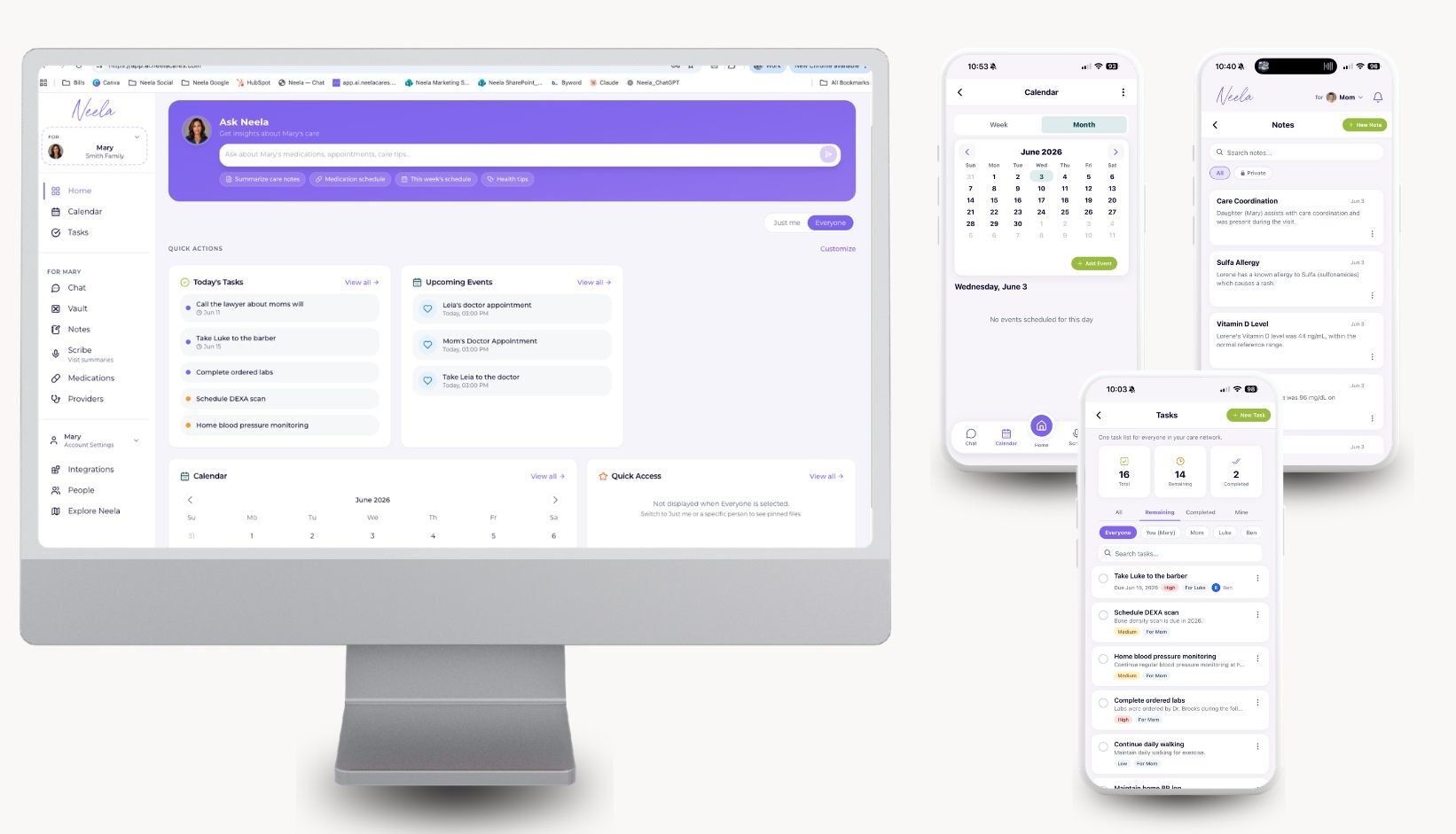
Caregiving rarely fits on a single to-do list. Appointments, medication refills, things you noticed yesterday, things your sibling needs to handle, things you want to remember to ask the doctor. Neela brings tasks, calendar, and notes together in one place, connected to your loved one's records, so nothing important falls through the cracks. Built for family caregivers, not productivity gurus.
Stop juggling notebooks, group texts, and a half-dozen apps. Start carrying it together with Neela.
Who this is built for
Adult children caring for aging parents. Cardiology Tuesday, hair appointment Thursday, lunch with the grandkids Saturday. Keep the rhythm of mom or dad's life in one place that everyone helping can see.
Spouses and partners. The medication schedule, the next refill, the question that came up at 11pm. Capture it all without losing track.
Siblings coordinating from a distance. No more "did you remember to add Aunt Mary's birthday?" or "when's the next cardiology visit?" Same calendar, same tasks, same notes. Everyone can see.
New and expectant parents. Pediatrician visits, immunization deadlines, those small things you want to mention next time. Capture them in the moment, find them when you need them.
Why caregiving is hard to organize
Most family caregivers are not professional project managers. You become one by accident. One day you're watching your mom and her doctor talk about a new prescription, and the next you're somehow responsible for tracking refills, side effects, follow-up appointments, and what to ask next time.
The problem isn't that you don't have tools. It's that you have too many. A notebook in your bag. A calendar app on your phone. A group text with your siblings. A folder of papers from the last visit. None of them know what the others know.
By the time it's all written down, it's already half-forgotten.
What you can do
Three connected tools that work the way caregiving actually works.
Tasks. Capture what needs to be done, assign it to yourself or someone in your care network, and check it off when it's handled.
Calendar. See every appointment, refill date, and care commitment in one shared view that your whole care network can read.
Notes. Save the small things you want to remember, like the question that came up at 2am or the symptom you noticed yesterday. They'll be there when you need them.
All three are connected to your loved one's records in the Vault, and Neela can pull from any of them when you ask her questions in Chat.
Tasks
Caregiving comes with a thousand small to-dos that don't fit on a regular productivity app's clean little checklist. Refill the prescription before Sunday. Call the insurance company about the imaging bill. Pick up the compression socks. Print the form for next week's neuro visit. Order the new walker.
Tasks are built for the way caregiving actually shows up, in pieces, throughout the day.
With Neela, you can:
- Add a task in seconds, by typing or by asking Neela in Chat ("add a task to call Dr. Patel about the BP meds")
- Assign tasks to yourself or anyone in your care network
- See what's been done and what's still pending
- Set reminders so things don't slip
Tasks pull context from your loved one's records, so when Neela helps you set them up, she already knows what medications they're on and which doctor said what.
Calendar: One Shared Care Calendar for Everyone Helping
The single hardest thing about caregiving across multiple people is that nobody has the full picture of the schedule. Mom's cardiology is Tuesday. Her hair appointment is Thursday. The home aide comes Monday and Friday. Lunch with grandkids is Saturday. Four people trying to plan visits around a schedule nobody has written down.
A care calendar solves this. It's a shared calendar built around one person's care, with their appointments, medication refills, home aide visits, and family commitments in a single view. Neela's caregiving calendar puts it all in one place that your whole care network can see.
With Neela, you can:
- See every appointment, refill, and commitment in one shared care calendar
- Share the calendar with your care network so siblings, your spouse, and anyone else helping can see what's coming up
- Add events by typing or by asking Neela ("schedule cardiology for next Tuesday at 2pm")
- Color-code by category if that helps you stay organized
- Get reminders before each event
When you scribe an appointment, the next follow-up automatically appears as a suggestion. When Neela hears about a new specialist in Chat, she can offer to schedule it. The care calendar is connected to everything else, so you spend less time entering information twice.
Notes
The information that matters most in caregiving usually shows up between appointments. He seemed more confused yesterday afternoon. She's eating less. The new medication makes him drowsy in the morning. The bruise on her arm is bigger than last week.
You won't remember any of that two weeks from now when the doctor asks. Notes are where you keep them.
With Neela, you can:
- Capture observations in seconds, on your phone, in your own words
- Save secure information like Social Security numbers, insurance details, or pharmacy login info, all encrypted and only visible to you
- Add anything you want to remember to ask the doctor at the next visit
- Pull notes up during an appointment so nothing gets forgotten in the moment
Notes are searchable and connect to everything else in Neela. The next time you scribe an appointment, the things you wrote down two weeks ago are right there if you need them.
How Tasks, Calendar, and Notes work together
A regular to-do list app treats every task like a standalone item. A regular calendar treats every event like a standalone event. They don't talk to each other, and neither one knows anything about the person you're caring for.
Neela works differently. The three tools share context with each other and with your loved one's records.
Here's what that looks like in practice:
- You scribe a cardiology visit. The doctor mentions a follow-up in three months. The follow-up appears as a suggested calendar event. The instructions ("watch sodium intake, monitor BP") become suggested tasks.
- You add a note that mom seemed extra tired this week. Two weeks later you scribe her next appointment. The note is right there if you need to mention it.
- Your sibling adds "ask about the new medication" to the shared task list. When you walk into the appointment, that task is on your phone, ready to bring up.
- Neela sees patterns across all three. If a task is overdue and an appointment is coming up, she'll mention it. If you've added several notes about a symptom, she might suggest writing it down for the doctor.
This is what caregiving software actually needs to do. Help you carry it together with the people who matter, and remember the things you can't.
How is this different from a regular to-do list app?
Apps like Todoist, Apple Reminders, Google Calendar, and Cozi are built for general productivity. They work fine for grocery lists, work projects, or family schedules. They are not built for caregiving.
Neela is. The differences show up in three places.
First, context. A task in Todoist is just a string of text. A task in Neela connects to your loved one's records, medications, and appointments. When you ask Neela to "add a task to follow up about the dizziness," she already knows your dad has been on a new BP medication for two weeks.
Second, collaboration. Most productivity apps are built for one user. Neela is built for a care network. Your sibling, your spouse, and anyone else helping can see the same tasks, calendar, and notes you do, in real time.
Third, AI assistance. Neela understands caregiving language. You don't need to manually create a task, set a date, and tag a category. You can just say "remind me to ask about the bruise on her arm at the next appointment" and Neela handles the rest.
Use a regular to-do list for groceries. Use Neela for caregiving.
Sharing with your care network
Caregiving is rarely one person's job, even when one person ends up doing most of it. There's the sibling who flies in for visits. The spouse who handles medication. The neighbor who checks in. Maybe a hired caregiver who comes a few days a week.
When you invite them to your Neela account, they see the same tasks, calendar, and notes you do.
- No more forwarding screenshots from one person's notes app to another's email
- No more "did anyone tell mom's brother about the new doctor?"
- No more group texts where the important details get lost in the small talk
Everyone in your care network sees the same picture. You stay in control of who has access, and you can revoke it at any time.
How to use (Mobile)
To add a task:
Open the Neela app, tap Tasks, and tap the plus button. Type what needs to be done, set a due date if you want, and assign it to yourself or someone in your care network.
To schedule a calendar event:
Open Calendar, tap a date, and add an event. Or just tell Neela in Chat: "schedule cardiology for next Tuesday at 2pm."
To save a note:
Open Notes, tap the plus button, and type whatever you want to remember. For sensitive information like Social Security numbers or pharmacy logins, use the secure note option.
To share with your care network:
Open settings and invite people by email. Once they accept, they see everything you've added.
Common questions about organizing caregiving
What's the best app to organize caregiving for an aging parent?
Neela is built specifically for family caregivers. Unlike generic to-do or calendar apps, Neela connects tasks, calendar, and notes to your loved one's medical records and uses AI to help you stay organized.
How is Neela different from Todoist or Apple Reminders?
Todoist and Apple Reminders are general productivity apps. Neela is built for caregiving. Tasks in Neela connect to your loved one's records, are shareable with your care network, and can be created with natural language ("remind me to ask about the dizziness next visit").
What is a care calendar?
A care calendar is a shared calendar built around one person's care: their appointments, medication refills, home aide visits, and family commitments, all in one view. In Neela, the care calendar is shared with your whole care network and connected to your loved one's records.
Can I share my caregiving calendar with siblings or my spouse?
Yes. When you invite siblings, your spouse, or anyone else in your care network to your Neela account, they see the same calendar, tasks, and notes you do. You can revoke access at any time.
How do I create a shared caregiving calendar for my family?
Start a free trial of Neela, add your loved one's appointments and reminders, then invite family members to your care network. Everyone you invite sees the same caregiving calendar in real time, on mobile or web.
Is there a free care calendar app for family caregivers?
Generic calendar apps are free, but they aren't built for caregiving. Neela's care calendar connects to tasks, notes, and your loved one's records, and you can try everything free for 7 days.
How do I track caregiving tasks across multiple family members?
Add everyone helping to your care network. Tasks can be assigned to specific people, and everyone sees what's been done and what's still pending. No more group texts to coordinate.
Can I add a task by talking to Neela?
Yes. You can ask Neela in Chat to add a task, schedule an appointment, or save a note. For example, "add a task to refill mom's BP medication before Sunday" or "schedule cardiology for next Tuesday at 2pm."
Are my caregiving notes private?
Yes. Notes are private by default. Only you and the people you invite to your care network can see them. Sensitive information like Social Security numbers can be saved as encrypted secure notes visible only to you.
What happens to tasks and calendar events if I scribe an appointment?
After scribing, Neela suggests follow-up tasks and calendar events based on what was discussed. You decide what to add, edit, or skip.
Can I use Tasks, Calendar, and Notes separately, or do I have to use all three?
You can use any of them on their own, but they're more useful together. Each one becomes more powerful when connected to the others and to your loved one's records.
Is Neela free?
Neela includes a free 7-day trial of all features, including Tasks, Calendar, and Notes. After the trial, paid plans are listed on the pricing page.