Table of Contents
The Neela Vault
Personalized care starts with understanding your loved one
Neela Vault is a secure place for family caregivers to store and organize their loved one's medical records, lab results, medication lists, appointment summaries, and care notes. Upload a document from your phone, your camera roll, or a cloud drive. Neela uses what's inside to give context-aware answers when you ask her questions in Chat. Stop hunting through portals, emails, and notebooks.
Instead of generic advice, Neela uses what's in the Vault to tailor guidance to your specific caregiving situation.
Who Neela Vault is built for
Adult children caring for aging parents. Cardiology, primary care, dermatology. Most aging parents see four or more doctors. Vault holds records from all of them in one place.
Spouses and partners. Health information that used to be one person's job is now yours. Vault keeps it organized so you don't have to memorize it.
Siblings coordinating from a distance. Get access to the same records as the sibling on the ground. No more "can you forward me that lab report?"
New and expectant parents. Pediatric records, immunization schedules, allergy lists. Store everything from day one and pull it up at the front desk in seconds.
Why the Vault exists
Caring for a loved one means keeping track of a lot of information:
- Medical conditions and diagnoses
- Medications and treatment plans
- Preferences, routines, and history
- Notes from appointments and conversations
That information is often scattered across portals, notebooks, emails, and memory. The Vault brings it together in one place, so you don’t have to hold everything in your head.
More importantly, it allows Neela to understand the full picture, not just isolated questions.
What you can store in the Vault
The Vault is designed to capture the details that matter most for caregiving, including:
- Health conditions and medical history
- Medications, symptoms, and changes over time
- Care preferences and daily routines
- Important context you want Neela to remember
You control what information you add and can update it at any time as things change.
How do I organize my parent's medical records?
Most family caregivers end up with medical records scattered across patient portals, paper folders, photos on their phone, and email attachments. Neela Vault centralizes everything in one secure place. Upload PDFs, images, or photos of paper documents from your phone, and Neela files them in your Vault. You can also add medical history, conditions, medications, allergies, and care preferences. Once it's in the Vault, Neela can reference any of it when you ask her questions in Chat or use Scribe during an appointment.
You don't need to upload everything at once. Start with whatever you'd reach for first, like a current medication list or the last visit summary, and add more as it comes up.
How the Vault powers personalized guidance
Neela doesn’t just store information. It uses it to adapt its responses and recommendations to your loved one’s unique situation.
For example:
- If your loved one has a specific condition, Neela can tailor guidance to that condition
- If a medication is added or changed, Neela can adjust related advice
- If you mention a concern that connects to something already in the Vault, Neela can respond with context in mind
This means less repetition, fewer generic answers, and support that feels more informed and human.
Privacy, security, and control
We know that storing personal health information comes with real concerns. The Vault was built with privacy and trust as core principles.
Here’s what that means in practice:
- Your data belongs to you
- Information in the Vault is not sold or shared
- Access is restricted and protected using industry-standard security practices
- You can edit or delete information at any time
Neela uses the information in the Vault only to support you and your loved one. Nothing else.
Transparency matters, especially in caregiving. The Vault is designed to earn your trust, not assume it.
How is Neela Vault different from MyChart?
MyChart shows you what one doctor knows about your loved one. Neela Vault holds everything you know. Every visit, every medication, every change you've noticed, in one place that you and Neela can both pull from.
MyChart is built for patients to message their own healthcare provider. It works well for that. But when you're caring for someone else, you're juggling records from multiple doctors and pharmacies, and there's no single place that holds the full picture.
Neela Vault is the family caregiver's place. Use MyChart to message your loved one's doctor. Use Neela Vault to organize everything else.
How is Vault different from a file storage app?
Google Drive, Dropbox, and iCloud store files. They don't read them. You can save your mom's lab results to a folder, but when you ask "has her A1C been going up?" the folder can't answer.
Neela Vault is storage that understands what's inside. Upload a document and Neela reads it, files it to the right family member, and uses it the next time you ask her a question in Chat or record a visit with Scribe. The records become context, not just files.
Vault is also built around people, not folders. Everything is organized by the family member it belongs to, so your dad's cardiology report and your daughter's immunization record never end up in the same pile. And it's private by default, with access limited to the care network you choose.
Can I share Vault information with my care network?
Yes. You control who has access to your Neela account. When you invite siblings, your spouse, or anyone else in your care network, they can see the same records and care information you do. Everyone stays on the same page without forwarding documents over text or email. You can revoke access at any time.
How to Use the Vault
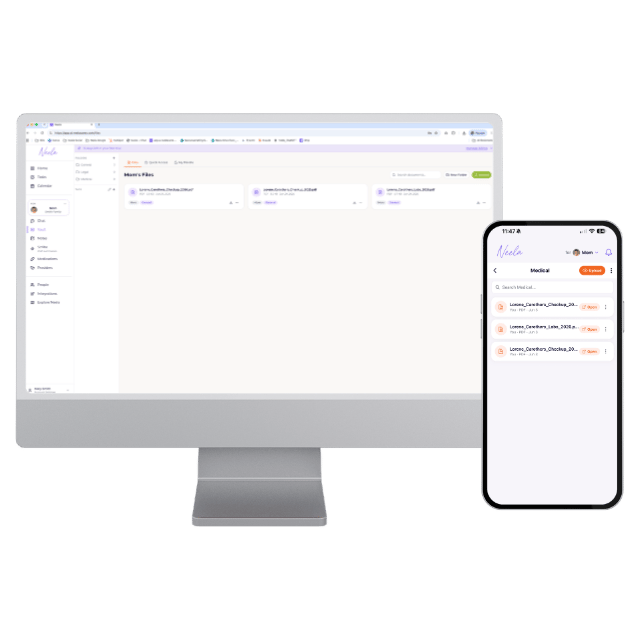
The Vault works the same way on mobile and web. Use whichever fits the moment, snap a photo of a document on your phone at the front desk, or upload a batch of PDFs from your computer at home.
On mobile
Step 1: Open the Vault. From your dashboard, tap the Vault tile to see all your documents in one place.
Step 2: Add a document. Tap the + button in the bottom corner. You can upload a file from your device or cloud storage (iCloud Drive, Google Drive, Dropbox), or a photo from your camera roll. (Options may vary slightly by device.)
Step 3: Upload and process. Neela uploads the file securely and shows a Processing status while it's added.
Step 4: Get confirmation. You'll get a notification when the document is ready, and it appears in your Vault list.
On web
Step 1: Open the Vault. Sign in at app.ai.neelacares.com and select Vault from the left menu.
Step 2: Check you're in the right profile. Confirm the profile selector on the left shows the person you're filing for, so the document lands in the right place.
Step 3: Upload. Click Upload in the top right and choose a file from your computer or cloud storage. Use New Folder if you want to organize documents into groups like General, Legal, or Medical.
Step 4: Review. Once processed, your document appears in the list where you can view, tag, download, or move it.
The fastest way: hand it to Neela in Chat
You don't have to go to the Vault at all. Attach a document right inside a Chat conversation, the same way you'd attach anything else, and Neela files it in the Vault for you. Just make sure you're in the right person's profile first, so it's saved to the correct family member. It's the quickest way to add a record when you're already talking to Neela about it.
Want screenshots and the full walkthrough? See how to use the Vault in Explore Neela.
Common questions about the Neela Vault
Is my information private?
Yes. The Vault is private by default. Information is protected and controlled by you, never sold or shared with third parties.
Can anyone else see what I add to the Vault?
No, unless you choose to share. Only you and the people you explicitly invite to your care network can access your Vault.
Can I share Vault information with my care network?
Yes. You can invite siblings, your spouse, or anyone else in your care network to your Neela account. They see the same records and care information you do. You can revoke access at any time.
How is Neela Vault different from MyChart?
MyChart is built for patients to communicate with their own healthcare provider. Neela Vault is built for family caregivers. It's a secure place to organize medical records from multiple doctors, plus medications, care preferences, and appointment summaries, so you and Neela can both reference them when you need to.
How is Neela Vault different from Google Drive or Dropbox?
File storage apps hold documents. Neela Vault reads them. When you upload a record, Neela uses what's inside to answer your questions in Chat and give context during Scribe sessions, and everything is organized by family member rather than by folder.
What types of medical records can I upload?
You can upload PDFs, images, and photos taken with your phone camera. Common uploads include lab results, imaging reports, discharge summaries, medication lists, vaccination records, insurance cards, advance directives, and notes from appointments.
Do I have to upload everything at once?
No. Start with one document, the one you'd most want handy at the next appointment. Neela works with whatever is in the Vault today and gets more useful as you add to it over time. Many caregivers add records as they receive them rather than all at once.
How does Neela use the information I add to the Vault?
Neela uses what's in the Vault to give context-aware answers when you ask her questions in Chat. For example, if your loved one has diabetes and you ask about a new medication, Neela knows to check for interactions. The more context you share, the more useful her answers become.
Do I have to add medical information to use Neela?
No. You decide what to include. The more context you provide, the more personalized Neela's guidance can be, but the choice is always yours.
What happens if I stop using Neela?
You retain control of your information and can remove it at any time.
Is this a replacement for medical advice?
No. The Vault helps Neela provide better caregiving support, not medical diagnoses or treatment decisions.
Can I add records without going to the Vault?
Yes. Just attach a document inside a Chat conversation, like any other attachment, and Neela files it in the Vault for you. Make sure you're in the right person's profile first so it saves to the correct family member. You can also upload directly in the Vault on both the mobile and web apps.
Get started
Start building a clearer picture of your loved one. Caregiving is complex, emotional, and deeply personal. The Neela Vault exists to support that reality by helping Neela understand your loved one as more than a list of symptoms.
When Neela understands your loved one better, it can support you better.
Sign Up for Free Here