Why Caregivers Still Need a Dedicated Care Coordination Companion, Even With ChatGPT Health
Caregivers need more than AI answers; they need tools like Neela for comprehensive care coordination and support over time.
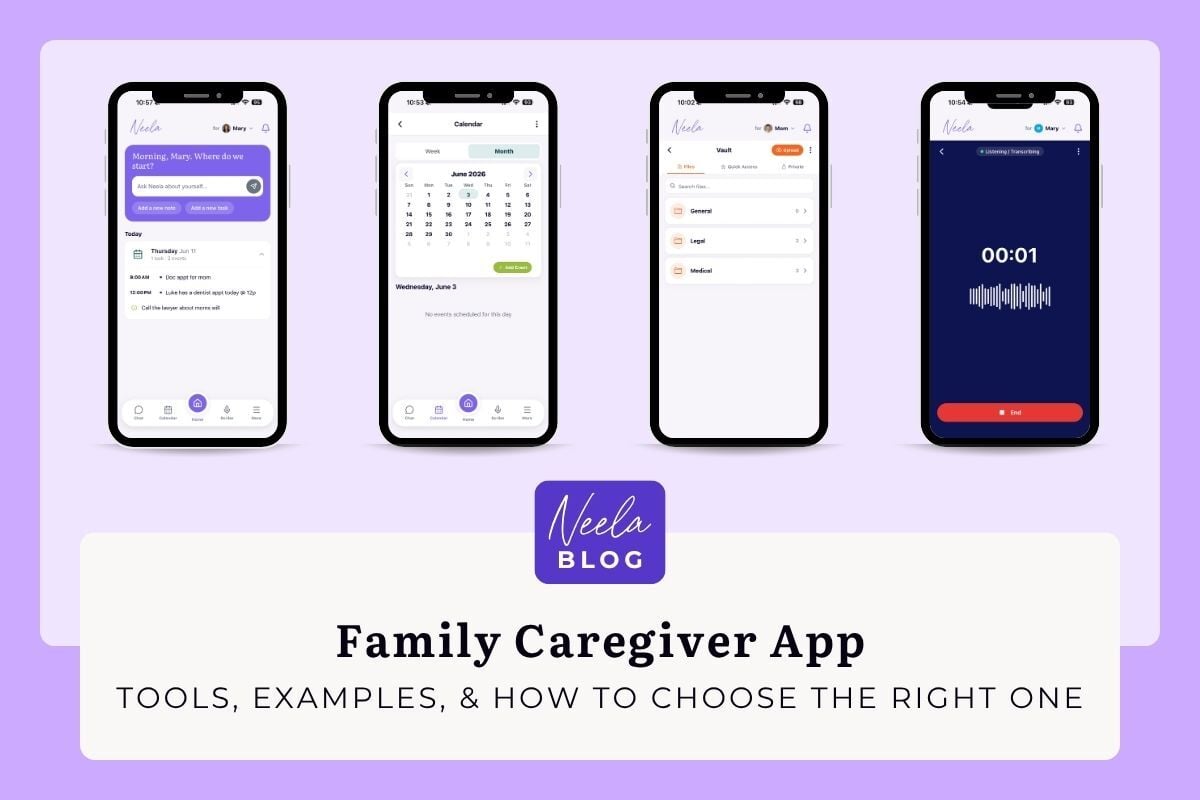
The best family caregiver app in 2026 depends on the job you need done. Neela is the strongest choice for organizing medical records and getting doctor visits captured and summarized. Caring Village fits families who want one shared hub, Medisafe handles medication reminders, and CaringBridge covers updates to a wide circle. Below, all 11 compared.
Most app roundups for family caregivers describe a category that has already moved on. Medisafe capped its free tier at two medications in January. CareZone has been shut down for years and still shows up on lists. At the same time, a new group of apps can sit in on a doctor visit and hand you the summary afterward.
The table below compares 11 apps that are live and supported in 2026, with current pricing and what each one is actually good at. Start there, then jump to the section for whatever you're trying to solve.
| # | App | Best for | Price | Platforms |
|---|---|---|---|---|
| 1 | Neela | Doctor visit transcripts and summaries | 7-day free trial, then $12/mo | iOS, Android, web |
| 2 | Caring Village | All-in-one family organizing hub | Free tier, paid from $14.99/mo | Web, iOS, Android |
| 3 | Tendercare | Finding vetted elder care professionals | Free, paid upgrades | iOS, Android |
| 4 | CaringBridge | Sharing health updates with a wide circle | Free | Web, iOS, Android |
| 5 | Lotsa Helping Hands | Volunteer sign-ups for meals and rides | Free | Web, iOS, Android |
| 6 | ianacare | Rallying help from friends and family | Free core app | iOS, Android, web |
| 7 | Connected Caregiver | Remote safety and vitals monitoring | Free app, devices from $5/mo | iOS, Android |
| 8 | Medisafe | Medication adherence and reminders | Free (2 meds), Premium $4.99/mo | iOS, Android, web |
| 9 | MyTherapy | Medications plus a health diary | Free | iOS, Android |
| 10 | Apple Health Medications | Basic reminders already on your iPhone | Free, built in | iPhone, iPad, Watch |
| 11 | Life360 | Location sharing and crash detection | Free tier, paid tiers vary | iOS, Android |
If you have tried regular health apps and felt like they were not built for caregivers, there is a structural reason for that.
If you are an adult child helping an aging parent navigate the health care system, this guide is for you.
Family caregiver apps provide essential tools and resources to support and coordinate a loved one's care, including features for communication, medication management, and overall caregiving support tailored to your family member's needs.
These caregiving apps live on iOS and Android devices and often include web dashboards for access from any computer. They work across mobile phone apps and desktop browsers, syncing in real time so that every family member sees the same information. Whether you are managing appointments, tracking symptoms, or storing important documents like insurance cards and advance directives, a single app can replace the chaos of spreadsheets and sticky notes.
In the United States, 63 million people, nearly 1 in 4 adults, provide ongoing care for an adult or a child with a complex medical condition or disability, according to the 2025 Caregiving in the US report from AARP and the National Alliance for Caregiving. That is 20 million more caregivers than a decade ago. Nearly 1 in 4 provide 40 or more hours of care per week, and 1 in 5 say their own health is fair or poor because of caregiving. These numbers explain why mobile apps for caregivers have grown rapidly since 2020. Digital tools help families avoid missed doses, duplicate appointments, and the slow burn of caregiver burnout that comes from trying to hold everything in your head.
This article provides a fast overview of top caregiver apps, explains core features to look for, and offers guidance on matching apps to different caregiving situations. Here is what a good family caregiver app can help you accomplish:
This section is a fast answer for readers who want names of apps right away. Below is a category-by-category overview of real app examples available in 2026.
Communication and updates: CaringBridge and Lotsa Helping Hands let families post medical updates, photos, and requests for help in a central location instead of using scattered text threads. Both are free to use and available on iOS and Android devices.
Care coordination and info storage: Caring Village and Connected Caregiver offer shared to-do lists, calendars, and secure document storage. Caring Village includes an AI assistant named Julia that summarizes updates and helps caregivers stay organized.
Health monitoring and vitals: Remote monitoring tools connect to wearable devices to track blood pressure, glucose levels, and other vitals. These apps often integrate with devices for 24/7 data sharing with caregivers and clinicians.
Medication management: Medisafe is a widely used medication tracking app with drug interaction warnings and refill reminders. iPhone users can also use the built-in iOS Medications app introduced in 2022. Both are free with optional premium features.
Emergency readiness: The First Aid app from the American Red Cross provides step-by-step guidance for falls, choking, chest pain, and other emergencies. It is free on both app stores.
Caregiver self-care and community: Ianacare emphasizes mental health, peer support, and coaching services for the caregiver rather than only the care recipient. It connects caregivers with resources and allows broadcasting help requests to a support network.
AI-powered caregiving assistant: Neela combines appointment scribing, medication tracking, secure document storage, and AI-powered answers into a single app built specifically for unpaid family caregivers. Unlike coordination platforms, Neela works conversationally, you message her the way you would text a friend, and she remembers everything you share. Especially useful for adult children managing a parent's complex care, Neela handles the mental load of caregiving so you can focus on being present. Free 7-day trial, available on iOS, Android, and the web.
Most of these apps are available on the Google Play Store for Android devices and the App Store for Apple devices. Core versions are typically free, with premium tiers for additional features like remote monitoring or advanced reporting.
Many caregivers find that no single app does everything perfectly. Using two or three apps together, such as pairing a medication app with a communication hub, often works better than searching for one do-it-all solution. The sections below explain how to evaluate which combination fits your situation.
Before exploring specialized tools, focus on the foundations. Most caregiving apps cover similar core capabilities, and these should be your baseline when evaluating options.
A reliable family caregiver app should help you manage the essential daily tasks of caregiving without requiring extensive technical knowledge. The right tools will reduce mental load and help caregivers stay organized without adding complexity.
Shared calendar with recurring appointments: Look for a calendar that supports recurring events. Everyone in the care circle should see updates instantly so there are no scheduling conflicts or missed appointments.
Medication reminders with detailed instructions: The app should handle multiple medications with different dosing schedules. Features should include dose amounts, timing, special instructions, and refill alerts. Good medication management prevents dangerous missed doses.
Secure notes and document storage: Caregivers need a place to store important documents like insurance cards, advance directives, rehab discharge summaries, and lab reports. Look for HIPAA-aligned encryption and the ability to share documents with specific people.
Role-based access controls: Not everyone needs to see everything. The best apps let you specify what each person can view and edit. A paid home aide might need the medication schedule but not financial documents. A distant sibling might need updates but not editing privileges.
Activity and symptom logs: A wellness journal for tracking blood pressure, weight, sleep quality, or behavioral changes helps identify patterns over time.
Push notifications and customizable alerts: Reminders should reach caregivers through their preferred channel. The ability to adjust alert frequency prevents notification fatigue.
Cross-device syncing: Apps should work smoothly on current iOS and Android versions and sync seamlessly across devices.
Prioritize reliability and simplicity over flashy features you will never use. An app that does five things well is more valuable than one that does twenty things poorly.
Family caregivers manage multiple responsibilities daily. These tasks include medication reminders, appointment coordination, and family communication. Modern caregiver apps provide essential tools for building support networks that ensure all care participants stay connected and informed.
Modern caregiving apps excel at uniting entire care circles through shared calendars, task lists, and real-time updates. Family members, friends, and healthcare professionals access the same information, eliminating missed appointments, duplicate efforts, and communication errors. These improvements directly reduce caregiver stress.
Medication management represents another key strength. Top caregiver apps provide comprehensive medication tracking with reminders for multiple medications, drug interaction alerts, and refill notifications. Complex medication regimens become manageable rather than overwhelming.
Mental health support for family caregivers is receiving increasing attention across these platforms. Many applications now include wellness journals, self-care resources, and coaching services. Peer support groups provide additional connection opportunities. These features encourage caregivers to prioritize their own health needs while managing the demands of caregiving.
Most caregiving applications support both Apple and Android devices. Many platforms offer free versions or trial periods through standard app stores. Testing multiple applications helps identify the best solutions for your specific needs.
No single app does everything perfectly, so understanding the different types of apps for caregivers helps you build the right toolkit for your situation.
Communication hubs solve the problem of scattered information. Apps like CaringBridge and Lotsa Helping Hands create a central place where families post medical updates, share photos, and request help. Instead of sending the same text to twelve relatives, you post once and everyone stays on the same page. Standalone health apps were not designed for the multi-user reality of family caregiving, which is part of why caregivers turn to dedicated coordination platforms.
Coordination and task apps handle the logistics of who does what and when. Platforms like Caring Village and Connected Caregiver let you assign tasks and maintain shared calendars and to-do lists. These apps often include secure notes and document storage for centralizing medical records.
Medication and regimen apps focus almost entirely on medication tracking. Medisafe sends alerts when it is time to take pills, warns about drug interactions, and generates adherence reports you can share at the next clinic visit.
Remote health monitoring apps link to connected devices like blood pressure cuffs, glucometers, or wearables to capture vitals around the clock. Some include fall detection features that alert family members if an older adult has an accident.
Information and training apps provide education and emergency guidance. The American Red Cross First Aid app teaches what to do during falls, chest pain, or medication side-effect emergencies.
Self-care and support apps focus on the caregiver's wellbeing rather than just the care recipient. Ianacare provides mental health resources, peer support forums, coaching services, and help connecting caregivers to local services.
AI-powered caregiving assistants like Neela bring together multiple functions, appointment scribing, medication tracking, document vault, and conversational answers, in one app. For adult children managing a parent's care from a distance or alongside a full-time job, having everything in one conversational interface reduces the friction of switching between multiple tools.
Consider how a real caregiver might combine these categories. An adult daughter in Chicago caring for a parent with Parkinson's disease in Phoenix might use Neela as her central caregiving assistant for appointments, medications, and questions, and supplement with Ianacare for her own mental health support.
App stores are crowded with options. Caregivers must assess quality on their own using practical criteria.
Fit to your situation: Consider the care recipient's age, conditions, and whether you are caregiving locally or across distances. Think about how many family members are involved and what specific caregiving duties consume the most time.
Usability: Test whether the app is intuitive for everyone in your care circle. Large fonts, clear buttons, and minimal steps to log tasks matter. Ask yourself: could a less tech-savvy family member in their 70s use this without constant help? In a 2025 NORC survey, the most common barrier caregivers named was a care recipient who is unwilling or unable to use digital tools.
Privacy and security: Look for HIPAA-compliant encryption when apps store medical data. Check that privacy policies have been updated recently and clearly explain data sharing with advertisers, third parties, or research partners.
Interoperability: Can you export data to share with clinicians? Does the app integrate with wearable devices or patient portals? The ability to share information with the health care system improves care coordination.
Cost and value: Understand what is free versus subscription-based. Many apps offer free plans sufficient for typical family caregiving, while advanced features require monthly fees.
Evidence and credibility: Look for clinical partners, university affiliations, or health systems listed on the app's website.
Match the tool to the problem, not the other way around. If scattered communication and duplicated efforts among siblings are your biggest challenge, a coordination platform makes more sense than a standalone medication reminder app.
If you are an adult child managing a parent's care and want to start somewhere, Neela offers a free 7-day trial built specifically for family caregivers. No technical setup required.
Caregiver burnout is real and common. Signs include exhaustion that sleep does not fix, irritability with people you love, forgetfulness about your own health appointments, and creeping isolation from friends and activities you used to enjoy. Family caregivers often juggle jobs, children, and a parent's appointments with barely enough hours in the day.
A family caregiver app can reduce caregiver stress in concrete ways:
Offloading memory: Instead of holding everything in your head, store tasks, medication timings, and questions for the next doctor visit in your app. Neela is designed specifically for this, you message her the way you would text a friend about what is happening, and she remembers everything without any manual logging. Your brain can rest when the app handles the remembering.
Sharing responsibility: Assign tasks to other family members, neighbors, or faith community volunteers through shared calendars and to-do lists. Apps like Caring Village and Lotsa Helping Hands make it easy to ask for help without coordinating individually with each person.
Providing education and reassurance: Many apps include curated articles, videos, and decision aids about dementia, stroke recovery, or post-surgery care. Having reliable caregiver resources at your fingertips reduces anxiety about making the wrong decision.
Connecting caregivers to emotional support: Some apps offer messaging with peers, group forums, or links to hotlines and local support groups. Knowing that other caregivers face similar challenges helps combat isolation.
Apps cannot replace respite care or therapy, but they can make it easier to schedule breaks and communicate boundaries with family. When your own health suffers, you cannot provide good care.
Family caregivers often upload sensitive information: diagnoses, lab results, insurance numbers, and details about their loved one's care. Understanding where this data goes is essential.
Review privacy policies carefully: Look for the last update date and specific details about data sharing with advertisers, third parties, or research partners. Policies updated after 2023 are more likely to reflect current regulations.
Access control features: The best apps require PIN, fingerprint, or face ID login. They offer separate roles for family, paid caregivers, and clinicians. You should be able to remove someone from a care circle instantly if needed.
Data storage and backups: Understand whether information is stored in the cloud and where servers are located. Look for options to export your data or delete it permanently if you stop using the app.
Practical safety tips:
The convenience of having all information in one place comes with responsibility. Ask yourself: does this app need access to my location, contacts, or camera? If not, deny those permissions.
Imagine you are an adult child who has just downloaded Neela to support your parent after a hospitalization for heart failure. Here is how to get started.
Step 1: Set up your parent's profile. Open Neela and create a care profile for your parent. Add their name, diagnoses, allergies, emergency contacts, and a summary of their current situation. This becomes the foundation Neela draws from every time you ask a question or record a conversation.
Step 2: Upload key documents to the Vault. Use Neela's Vault to store the hospital discharge summary, current medication list, insurance card, and any advance directive documents. These are stored securely and available instantly when you need them, at the pharmacy, at the front desk, or at the next appointment.
Step 3: Set up the Calendar and Tasks. Add follow-up cardiology and lab appointments to Neela's shared Calendar. Create Tasks for things like picking up prescriptions or calling the insurance company. Assign tasks to siblings or other family members so the load is shared.
Step 4: Use Chat to get answers in the moment. Standing in the pharmacy and unsure whether a supplement interacts with your parent's medications? Ask Neela. She already has your parent's medication list in context and can give you a personalized, plain-language answer, not a generic Google result.
Step 5: Use Scribe at the next appointment. When you arrive at the cardiology follow-up, press the Scribe button and let Neela listen. She captures the conversation, summarizes what the doctor said, and highlights any next steps or follow-up questions. You stay present and focused on your parent instead of scrambling to take notes.
Step 6: Use Notes for the 11pm thought. Two weeks before the next appointment, you remember a question at 11pm. Add it to Neela's Notes. It will be waiting for you when you walk into that exam room.
A day in the life: On a busy Tuesday, you wake to a notification reminding you that Dad's diuretic should be taken with breakfast. At lunch, you check the Chat log and see that your sister asked Neela a question about his low-sodium diet, and got a clear answer. After work, you confirm tomorrow's lab appointment is on the shared Calendar and that your brother has the transportation task. Before bed, you add a question to Notes for next week's visit. Neela holds everything so you do not have to.
The family caregiver app landscape is evolving rapidly. Development is moving toward multifunctional platforms co-designed with caregivers. Here are concrete trends shaping the next few years.
Integration with electronic health records: Future apps will sync with hospital patient portals so that appointment lists, medication changes, and discharge instructions appear automatically.
Expansion of remote patient monitoring: Hospitals and insurers are increasingly providing connected devices, blood pressure cuffs, glucose monitors, pulse oximeters, that feed data directly into caregiver apps, enabling earlier intervention.
Greater focus on supporting the caregiver: Apps are adding stress tracking, mood check-ins, and AI-based triage that suggests when to call a provider. Future versions may predict crises through pattern recognition.
Disease-specific tools: Expect more apps tailored to specific conditions. Apps for dementia might include wandering alerts and behavioral tracking. Home dialysis apps might guide daily regimen compliance.
AI for communication and decision support: Generative AI is already summarizing visit notes, generating questions to ask doctors, and drafting update messages for extended family. Neela is built around this capability today, giving family caregivers a conversational AI that knows their loved one's actual records and history.
Current limitations include gaps in equitable access for low-income and rural families, lingering integration problems with legacy health systems, and the risk of alert fatigue from too many notifications. Progress depends on continued investment and design that prioritizes simplicity.
There is no universally best family caregiver app. There is only the best match for your specific needs, your loved one's conditions, and your family structure. A caregiver managing appointments for a parent with early dementia has different requirements than one coordinating post-surgery recovery for a spouse.
When choosing a family caregiver app, keep three principles in mind:
Family caregiving is demanding, often invisible work. The right tools do not eliminate the hard parts, but they reduce friction, save time, and protect your mental health along the way. Pick one app to test this week. Use it for seven days. Notice what reduces your stress the most, and build from there.
Many are. CaringBridge, Lotsa Helping Hands, and MyTherapy are free with no paid tier, and ianacare's core app is free as well. Others run a limited free tier: Medisafe now caps free accounts at two medications. Paid family apps generally fall between $12 and $25 per month. Neela is $12 per month, or $10 per month billed annually, after a 7-day free trial.
It depends on the problem you are solving. If you want doctor visit notes captured and summarized for you, Neela. If you want one shared hub the whole family logs into, Caring Village. If medications are the main issue, Medisafe. If you mostly need to keep relatives updated, CaringBridge. Most families settle on one primary app and add a second for a specific job.
Yes, though the options narrowed in 2026. MyTherapy is free and includes reminders plus a health diary. iPhone users can use the Medications feature built into the Apple Health app at no cost. Medisafe still has a free tier, but as of January 2026 it is limited to two medications, so a longer list requires Premium at $4.99 per month.
Security varies enough that it is worth checking before you upload anything. Look for encryption in transit and at rest, permission settings that let you control who sees what, and a privacy policy that states plainly the company does not sell your data. Any app holding health information should explain its HIPAA posture. Avoid keeping medical details in a general notes or group messaging app.
Most do, but not all. Neela, Caring Village, CaringBridge, Lotsa Helping Hands, Medisafe, and MyTherapy run on both, and Neela also works in any web browser. Apple Health Medications is iPhone only. Several other apps offer browser access as well, which covers a family member whose phone is not supported. Check this before you send invitations, because someone on the wrong device cannot join.
Start small. Pick one job for the app to own, usually the calendar or the medication list, and let everyone see it working before adding more. Invite two people rather than eight. Fill in real information first so the app is not empty when they open it. A free tier or free trial makes the ask easier, since nobody has to pay to look.
Yes, and most families do. A common setup is one app holding appointments, documents, and tasks for the care network, plus a dedicated medication app alongside it. The tradeoff is that information lives in two places. If you notice yourself entering the same details twice, that is the signal to consolidate.
At minimum: a shared calendar, storage for documents like insurance cards and advance directives, a medication list, and permissions so each person in your care network sees only what they should. Beyond the basics, the features that save real time are appointment notes you do not have to type yourself and one search box that covers everything.
Ready to try Neela?
Start your free 7-day trial, built specifically for family caregivers. Cancel anytime before your trial ends and you won't be charged. Start your free trial.
Complete the form to receive notifications when new blogs are posted. You will only receive an email once a month!
Caregivers need more than AI answers; they need tools like Neela for comprehensive care coordination and support over time.
Family caregivers need apps designed for their unique challenges, not just for patients. Discover what works for effective caregiving and symptom...

Learn how to organize a caregiver binder to centralize medical records and medication schedules, ensuring you have critical information ready for...